
Query & analyze
Natural language to SQL
You don't have to write the SQL yourself. Above the playground editor sits an AI bar — "Ask AI to help write your query..." — that turns a plain-English request into a runnable query.
Ask for a query#
Type what you want and press Run:
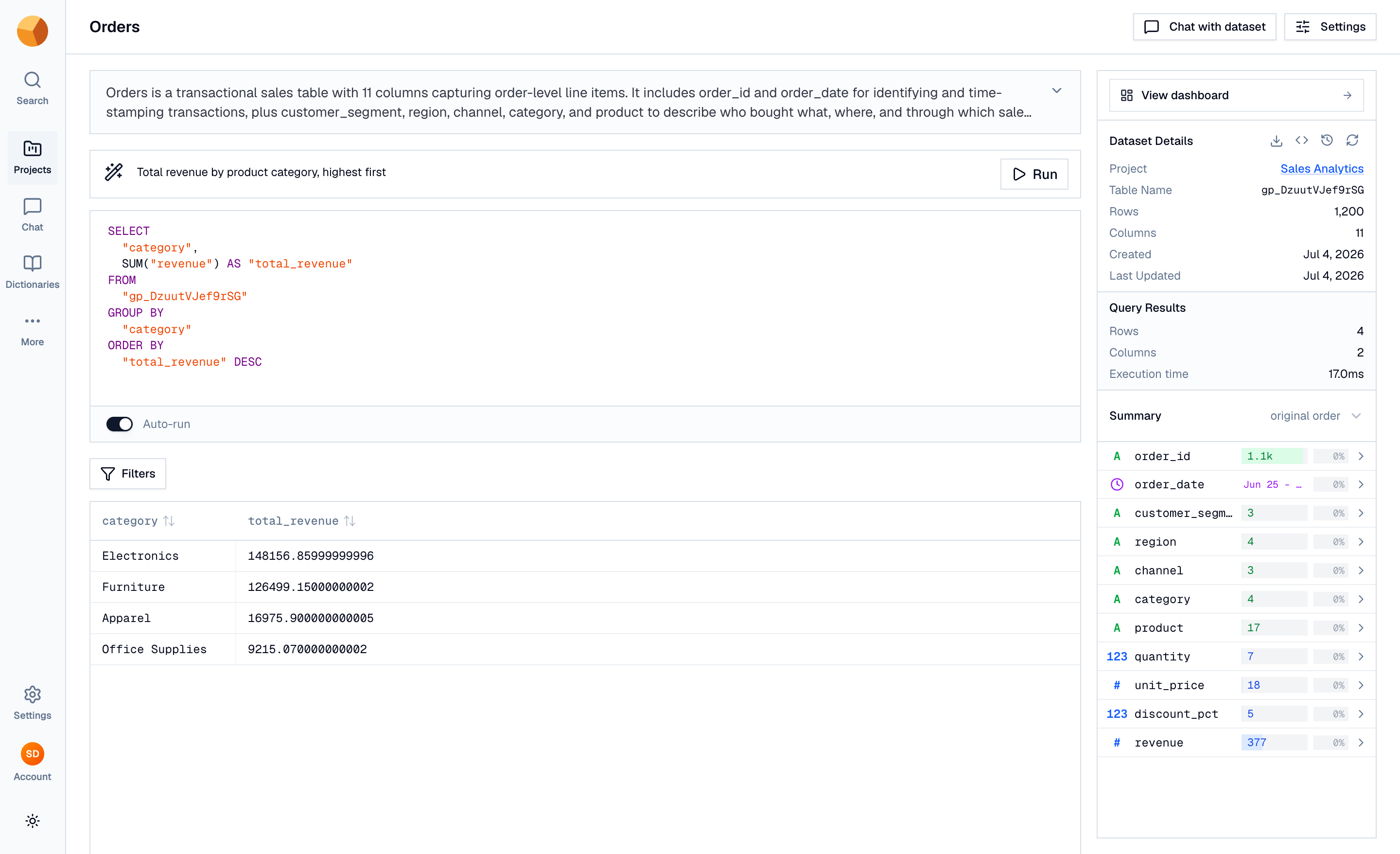
The generated SQL is formatted, dropped into the editor, and executed immediately — you see the query and its results in one step. From there it's ordinary SQL: edit it by hand, re-run it, or use it as the starting point for something bigger.
Know what the AI sees#
The generation isn't guessing at your data — each ask is grounded in:
- The table schema — column names, types, per-column descriptions, sample values, and value ranges.
- The dataset's description and its custom AI instructions, if you've written any.
- Project documents — uploaded reference material, used to map your business terms to actual column values.
- The SQL dialect — the AI writes SQL in GoPie's dialect automatically.
TipThe single best lever for better generated SQL is better column descriptions. A column documented as "Order total in USD, after discounts" gets used correctly; an undocumented
amt_2gets guessed at. See Schema & column descriptions.
Read the assistant's notes#
Sometimes the honest answer is that no SQL can answer your question — the data lacks the column, or the request isn't a query at all. Instead of failing, the bar shows an Assistant note explaining why (for example, that the dataset has no region column to group by). That's information, not an error: check the schema in the right rail, rephrase, and ask again.
A genuine failure — the service being unreachable, say — shows as a distinct Generation failed message.
Iterate on the result#
Each ask is independent — the bar doesn't remember your previous request, so "now filter that to 2024" won't work. To refine, either fold the refinement into a fuller ask ("total sales by category in 2024") or just edit the generated SQL directly in the editor. Running your own SQL dismisses any assistant note.
Write asks that work#
Specific asks produce dramatically better SQL than vague ones:
| Instead of | Ask |
|---|---|
| "Show sales" | "Total sales by product category for the last 90 days" |
| "Best customers" | "Top 10 customers by lifetime order value" |
| "Recent stuff" | "Orders placed in June 2026, newest first" |
Three habits pay off: name a time frame, name the aggregation you want (total, average, count, top N), and use the terms your columns are documented with. If your team's vocabulary differs from the column names, document the mapping in column descriptions or project documents — the AI reads both.
Choose the right tool#
The playground bar is a SQL authoring tool: one ask, one query, results in the grid. For a conversation — follow-up questions, charts, explanations, answers across many datasets — use chat instead. Same intelligence, different shape.