
Datasets & sources
Version history & time travel
GoPie datasets keep their history. Every write — the first ingest, an append, a refresh, a restore — records an immutable version. You can look at the data exactly as it was, diff two versions, and roll back, all without ever losing the newer state.
Open the history#
Select the History button (clock icon) in the dataset page's right rail. The panel lists every version newest-first, grouped by day.
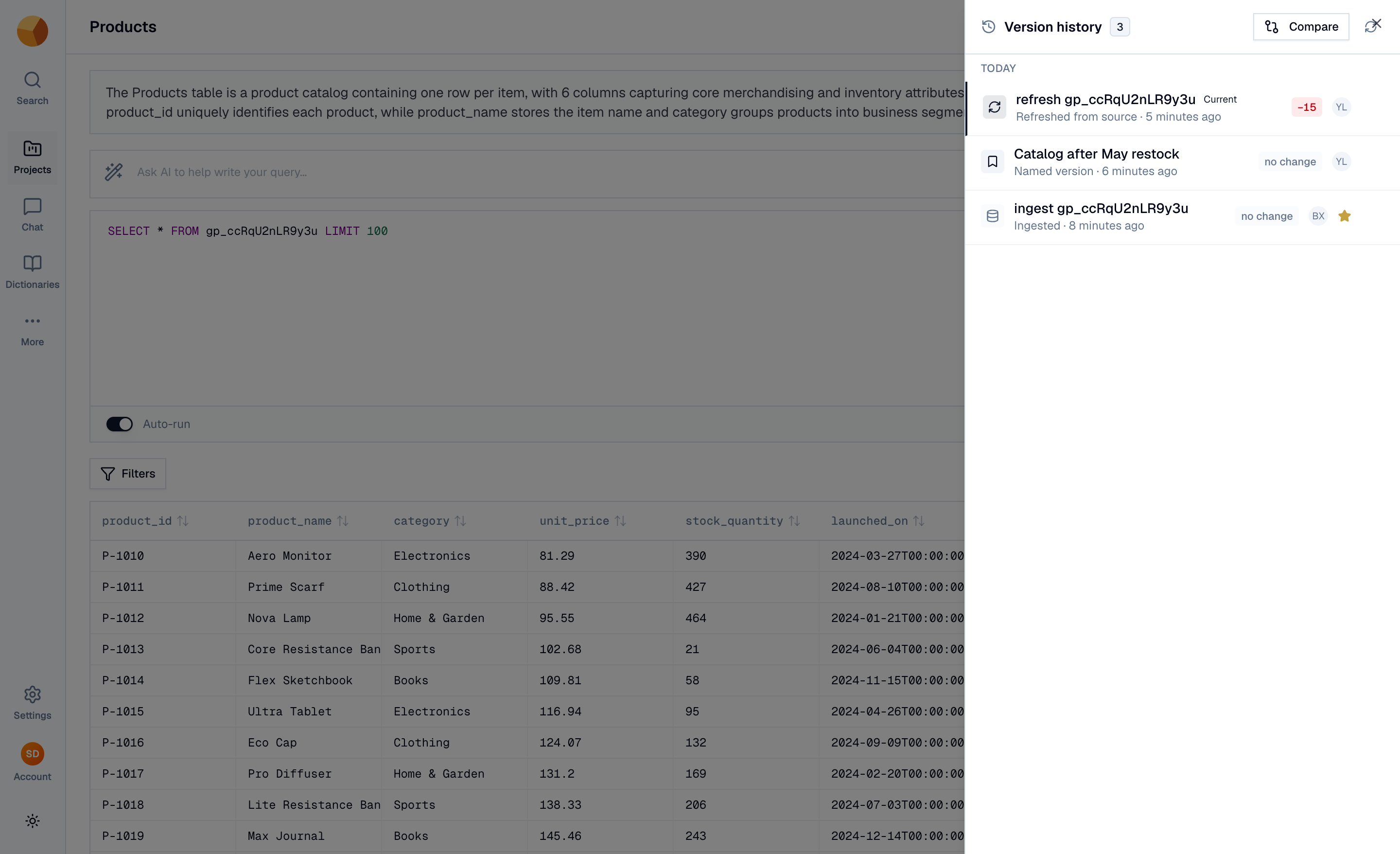
Each row shows:
- What happened — Ingested, Appended rows, Refreshed from source, Restored from earlier version, or Named version, with a timestamp and who did it.
- The row delta against the previous version —
+200,−15, or no change. - A star when the version is pinned, and Current on the latest.
Every version has an action menu: Preview this version, Restore this version, Compare with previous, Name this version…, Pin, and Copy version id.
NoteVersion numbers grow platform-wide, not per dataset — it's normal for a dataset's history to read v41, v45, v52. The order is what matters.
Preview an old version#
Preview this version reloads the dataset page as of that version — an amber bar pins the context:
Viewing version 7 · 3 minutes ago · 1,234 rows · read-only, changes are not saved
While previewing, the grid, profiles, and queries all read from that version; editing is disabled. The page URL carries the version (?asof=…), so you can share the link — anyone with access opens the same view. Select Return to latest to exit.
You can even chat with a version: Chat with dataset from a preview starts the conversation against that snapshot, and the composer shows an "Exploring version N" pill. Query results produced this way carry a provenance caption — "Results as of version N" — so historical numbers never masquerade as current ones.
Compare two versions#
Compare (in the panel header) or Compare with previous (on a row) opens the change feed. Pick the From and To versions and inspect three tabs:
- Inserted — sample of rows added in the range, with a count.
- Deleted — sample of rows removed, with a count.
- Schema — columns added, columns removed, and type changes between the two versions.
NoteIf retention cleanup has compacted the underlying files, row-level samples for old ranges may read "Change feed unavailable" — the schema diff still works.
Restore a version#
Restore this version (from the row menu, or the button on the preview bar) rolls the dataset back:
This will replace the current data with version 7 (1,000 rows; −200 vs now).
Restoring adds a new version that reproduces the old state — nothing is deleted, and history keeps flowing forward. Restored the wrong thing? Restore again, including back to what was current before. If the target version had a different schema, the dialog warns you: restoring reverts the schema too.
Restore, rename, and pin are available to dataset editors (owners, admins, or the dataset's creator); previewing and comparing are open to anyone who can view the dataset.
Pin or name a version#
- Pin protects a version from retention cleanup — pinned versions are kept forever, no matter the retention settings. Pin the version you baselined a report on, or the state before a risky refresh.
- Name this version… labels it ("Q3 close", "before dedupe") so the timeline reads like a changelog.
ImportantNaming a version does not protect it — only pinning exempts a version from cleanup. Name for meaning, pin for keeps.
Control retention & storage#
History costs storage. Settings → Maintenance → Storage & retention is the dial:
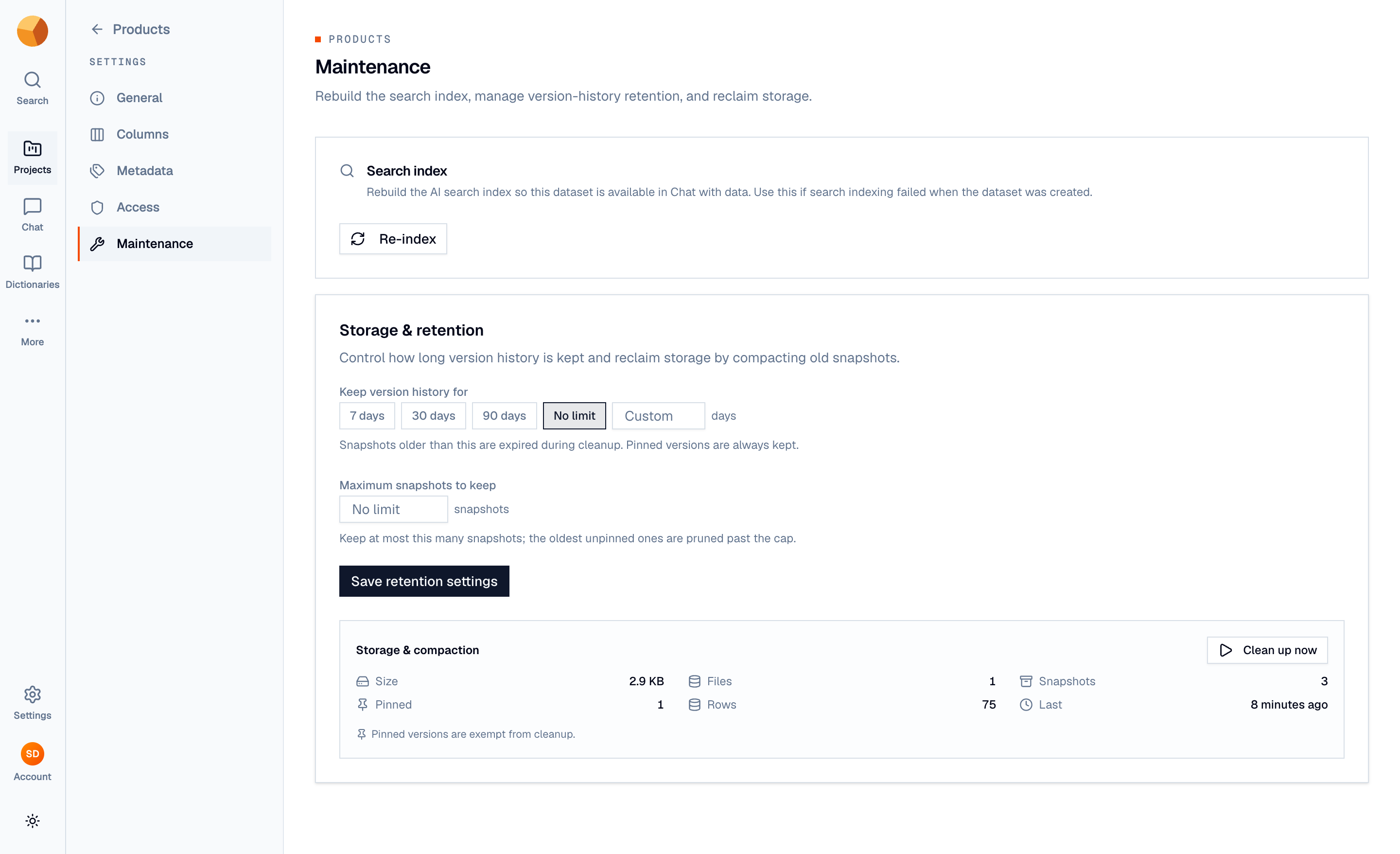
- Keep version history for — 7, 30, or 90 days, no limit, or a custom number. Versions older than this are expired during cleanup.
- Maximum snapshots to keep — an optional cap; the oldest unpinned versions are pruned past it.
- Storage & compaction — live statistics: total size, file count, version count, pinned count, and rows.
- Clean up now — runs cleanup immediately, with a dry-run preview first so you see exactly what would be expired and compacted before confirming. Pinned versions are never removed, and the current version is always safe.
Cleanup also runs as regular platform maintenance, so retention settings apply without you pressing the button.
Take time travel further#
The same version pinning works across GoPie — these get their own pages in later sections:
- SQL & API — queries accept a
snapshot_version, so scripts can read a dataset as of a version. - Chat — conversations can explore a version (the "Exploring version N" pill).
- Downloads — exports can be pinned to a version, for reproducible extracts.