
Query & analyze
Your dataset's REST API
The moment a dataset exists in GoPie, it's queryable over HTTP. No configuration, no publishing step — every dataset and every view gets a read-only REST endpoint with filtering, pagination, and column selection, plus a generated OpenAPI spec.
Explore it in the app#
The dataset page's right rail has an API Playground button — an interactive explorer for that dataset's endpoint:
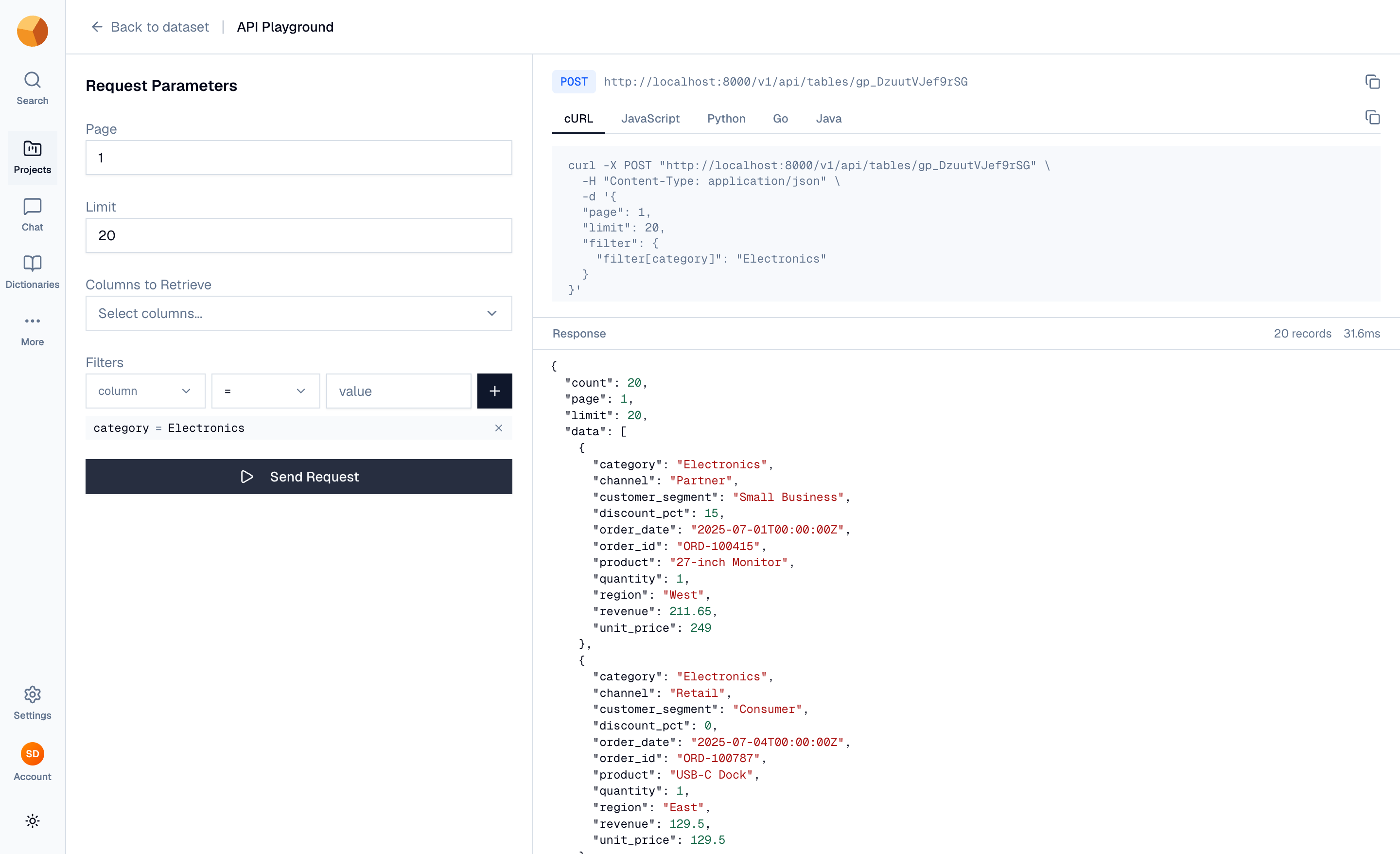
- Left: the request builder — page, limit (up to 1,000 rows per request), which columns to retrieve, and filters (
=,>,<per column, combined with AND). - Right: the exact
POSTURL, live code snippets in cURL, JavaScript, Python, Go, and Java that update as you tweak parameters, and a Send Request button that runs the call and shows the JSON response with its record count and timing.
Authenticate your own calls#
Inside the explorer, requests run as you. From your own code, you authenticate with an API key:
- Go to Settings → Applications and create an application (an application groups keys and defines which datasets they can reach).
- Open it, switch to the API Keys tab, and generate a key. Copy it immediately — it's shown only once.
- Send it as a bearer token on every request.
curl -X POST "https://<your-gopie-api>/v1/api/tables/gp_orders" \
  -H "Authorization: Bearer gp_pub_..." \
  -H "Content-Type: application/json" \
  -d '{"page": 1, "limit": 20}'
The explorer shows your deployment's real API base URL in the snippets. A key only reaches the datasets its application is scoped to.
Query rows#
The endpoint is POST /v1/api/tables/{table_name} with a JSON body:
{
  "columns": ["order_date", "category", "amount"],
  "sort": "-order_date,category",
  "limit": 50,
  "page": 2,
  "filter": { "filter[category]": "Electronics", "filter[amount]gt": "100" }
}| Field | Meaning |
|---|---|
columns | Columns to return; omit for all columns |
sort | Comma-separated columns; - prefix for descending |
limit | Rows per page, up to 1,000 |
page | 1-based page number |
filter | Map of conditions, AND-ed together |
Filter keys follow filter[column]op. The operators:
| Key form | Condition |
|---|---|
filter[col] | equals |
filter[col]neq | not equal |
filter[col]gt / filter[col]gte | greater than / or equal |
filter[col]lt / filter[col]lte | less than / or equal |
Comparison operators apply to numeric values; text values filter by equality. The response is a stable envelope:
{ "data": [ { "order_date": "2026-06-01", "category": "Electronics", "amount": 129.5 } ],
  "count": 4283,
  "executionTime": 12 }
count is the total matching rows — use it with limit/page to paginate through everything.
Run full SQL over HTTP#
When the filter grammar isn't enough, POST /v1/api/sql takes arbitrary read-only SQL — the same SELECT/WITH/DESCRIBE/SUMMARIZE rules as the playground, same 1,000-row cap per request, same per-dataset access checks:
curl -X POST "https://<your-gopie-api>/v1/api/sql" \
  -H "Authorization: Bearer gp_pub_..." \
  -H "Content-Type: application/json" \
  -d '{"query": "SELECT category, SUM(amount) FROM gp_orders GROUP BY 1"}'
The body also accepts "snapshot_version" to query a dataset as of a past version. The full endpoint catalogue — schemas, summaries, downloads, chat and more — is the API & MCP reference; Querying data covers this endpoint and its siblings in depth.
Grab the OpenAPI spec#
GET /v1/api/openapi/{table_name} returns an OpenAPI 3.0 spec generated live from the dataset's actual schema — its columns become typed response properties. Feed it to Postman, client generators, or anything else that speaks OpenAPI.
Remember views are APIs too#
Everything above works identically for views — a view's page has the same API Playground, and its table name works in the same endpoints. Define a join once as a view, and consumers get one clean API instead of orchestrating joins client-side.